Using a 5G backup router sounds ideal for emergency internet, but data plan limitations can sabotage your backup during critical moments. Many providers cap or throttle data, which can slow or exhaust your bandwidth exactly when you need reliable access most. This trap often catches users unaware, undermining their backup strategy. To keep your emergency internet dependable, you need to understand how data plans can undermine your setup—continue with this guide to learn more.
Key Takeaways
- Data caps and throttling can limit backup router effectiveness during critical outages.
- Many plans impose restrictions that slow or cut off emergency internet when limits are reached.
- Choosing plans with unlimited or high-capacity data is essential to prevent backup failures.
- Small print details often reveal hidden charges or reduced speeds after data thresholds.
- Proper plan selection and configuration ensure reliable, uninterrupted “emergency internet” via 5G backup routers.

As reliance on internet connectivity grows, having a dependable backup solution becomes indispensable for businesses and home users alike. 5G backup routers offer a fast and reliable way to guarantee your network stays online during outages or disruptions, providing peace of mind and continuous access to critical online services. These devices are designed to deliver high-speed internet through cellular connections, ensuring your network remains operational even when your primary connection fails. Achieving effective network redundancy is essential, and 5G routers excel at maintaining it by providing a seamless fallback that keeps your workflows, communications, and online activities uninterrupted.
One of the key advantages of 5G backup routers is their ability to deliver signal stability. Unlike traditional LTE or 3G backup options, 5G offers considerably faster speeds and lower latency, reducing the chances of buffering, lag, or disconnection during critical moments. The increased bandwidth means you can handle multiple devices or high-demand applications without degrading performance. This stability is especially important for remote work, video conferencing, or cloud-based services where even brief interruptions can cause frustration or data loss. By leveraging 5G technology, your backup connection becomes a dependable, high-quality alternative to your primary internet, ensuring continuity without sacrificing performance.
However, it’s important to recognize the limitations tied to data plans associated with 5G backup routers. Many providers impose data caps or throttle speeds after reaching certain thresholds, which can compromise the very idea of an “emergency” internet solution. When your backup plan relies on a data plan that becomes sluggish or costly after a few gigabytes, it defeats the purpose of having a resilient and instant fallback. This becomes especially problematic during extended outages, where you might unexpectedly run out of data or face restrictions that slow your connection precisely when you need it most. In such cases, the data plan trap can turn your reliable emergency internet into a frustrating bottleneck.
To avoid this pitfall, you need to carefully select plans that offer unlimited or high-capacity data options and understand the terms and conditions. Some providers might advertise unlimited plans but impose throttling or additional charges for excess usage, so it’s essential to read the fine print. Your goal should be to find a plan that guarantees consistent signal stability and reliable network redundancy without the fear of unexpected interruptions or costs. Only then can you truly rely on your 5G backup router as an effective safety net, rather than a costly or unreliable afterthought. When properly configured, a 5G backup router can be a key component of your network’s resilience strategy, but understanding the data plan trap is critical to ensuring it works as intended during those crucial moments.
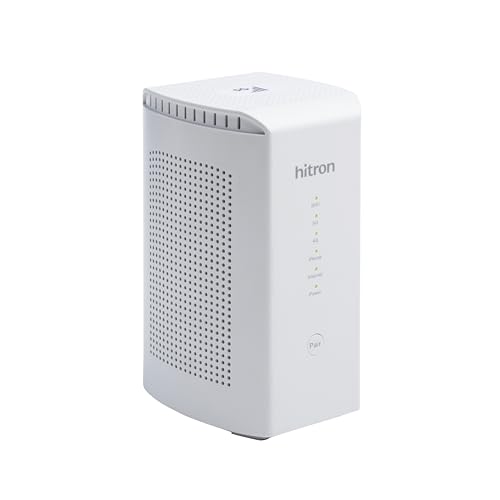
Hitron D60 5G Cellular Router with Sim Card Slot | AX3000 WiFi 6 Router with Mesh WiFi | Certified with T-Mobile, AT&T, US Cellular | Nano SIM, eSIM for Dual Failover Capability |Model # D60 5G
5G FAST INTERNET from just about ANYWHERE! This travel router can achieve download speeds up to 3.4 Gbps…
As an affiliate, we earn on qualifying purchases.
As an affiliate, we earn on qualifying purchases.
Frequently Asked Questions
How Reliable Are 5G Backup Routers During Widespread Outages?
During widespread outages, 5G backup routers can be fairly reliable if your signal stability remains strong and network latency stays low. You’ll experience fewer disruptions if your area has robust 5G coverage and your device maintains a steady connection. However, if signal stability drops or latency spikes, your backup internet may falter. Keep in mind, network conditions can vary, so it’s wise to test your setup regularly.
What Is the Typical Cost Difference Between 4G and 5G Backup Routers?
The price difference between 4G and 5G backup routers typically ranges from $50 to $200, depending on features and brand. A 5G router usually costs more upfront due to advanced technology, offering faster speeds and better coverage. The cost comparison shows that investing in a 5G backup router can be pricier initially, but it may provide improved reliability during emergencies, making it worth considering if you need robust backup internet.
Can Existing Internet Plans Be Upgraded to Support 5G Backup Routers?
You can often upgrade your existing internet plan to support 5G backup routers, but it depends on your provider’s internet plan limitations. Check if your plan allows for higher bandwidth or 5G compatibility; sometimes, a router firmware update is needed to optimize performance. Contact your provider to see if they offer plan upgrades or compatible devices, ensuring your backup connection is reliable when emergencies arise.
Are 5G Backup Routers Compatible With All Emergency Communication Systems?
Think of 5G backup routers as a universal key—yet, they might not open all doors. They aren’t compatible with every emergency communication system, as compliance with compatibility standards varies. You need to check your emergency protocols and system specs before relying on a 5G backup router. Ensuring compatibility minimizes the risk of communication breakdowns when disaster strikes, keeping your emergency plans as solid as a fortress.
What Security Concerns Are Associated With Using 5G Backup Routers?
When using 5G backup routers, you should be aware of security concerns like potential breaches of network encryption and device authentication. Hackers might exploit vulnerabilities to access sensitive data or disrupt your network. To protect yourself, confirm your router supports strong encryption protocols and requires robust device authentication. Regular firmware updates and secure configurations are essential to safeguard your emergency internet connection from cyber threats.

Franklin Wireless Jextream RG2100 5G Mobile Hotspot
Superior 5G Connectivity: Experience lightning-fast internet speeds with this Franklin Wireless JEXtream RG2100 mobile hotspot router, compatible with…
As an affiliate, we earn on qualifying purchases.
As an affiliate, we earn on qualifying purchases.
Conclusion
While a 5G backup router promises seamless connectivity in emergencies, don’t fall for the data plan trap. It’s like having a lifeboat that relies on expensive fuel—you hope you never need it, but when you do, the cost can sink you. So, before trusting your emergency internet to a shiny new device, consider the hidden expenses. Sometimes, sticking to your existing plan or exploring other options keeps you truly connected when it matters most.

GL.iNet GL-XE3000 (Puli AX) 5G Router with Dual SIM Card Slot, Wi-Fi 6 Cellular Routers, Built-in Battery, Multi-WAN, VPN, OpenWrt, Secure 5G Router for Office, Retail, Events, Business
【Fast Wi-Fi 6 Cellular Router】GL-XE3000 provides reliable cellular networks for remote access and high speed internet in urban…
As an affiliate, we earn on qualifying purchases.
As an affiliate, we earn on qualifying purchases.

Amazon Basics UPS Battery Backup & Surge Protector, 800VA/450W, 12 Outlets, Standby Uninterruptible Power Supply, Compact, Black
Standby uninterruptible power supply (UPS) with 800VA / 450W battery backup; ideal for home networks, IoT devices, and…
As an affiliate, we earn on qualifying purchases.
As an affiliate, we earn on qualifying purchases.