
When I compare an external SSD for high speed, I look beyond the largest advertised number: the drive, its connection, and the computer or phone attached to it all shape real transfer performance. The Fantom Drives Extreme 2TB leads for buyers with a compatible Thunderbolt port and large project files, while the SanDisk Extreme PRO combines a 2,000MB/s headline speed with rugged protection. For a simpler, broadly compatible choice, the Samsung T7 offers a more moderate 1,050MB/s ceiling and wide device support.

Get hardware and tech essentials delivered free with Prime
- Fast, free delivery on millions of items
- Prime Video, Amazon Music and more included
- Member-only deals all year
The main tradeoff is between maximum speed and practical compatibility. Some drives need a particular high-bandwidth port to approach their claims; others give up peak throughput for easier connections or stronger outdoor protection. I ranked these options by how useful their speed is likely to be for their intended buyer, alongside capacity, connectivity, and durability—not by headline speed alone.
Key Takeaways
- The Fantom Drives Extreme advertises up to 2,800MB/s and doubles the capacity of the 1TB picks, but its strongest performance depends on a Thunderbolt 3 or 4 port.
- The SanDisk Extreme PRO is the faster rugged 1TB option at up to 2,000MB/s, with IP65 protection and a 3-meter drop rating.
- The Lexar D70E pairs up to 2,000MB/s read speed with built-in USB-C and USB-A connectors, making it the easiest of these picks to plug into varied devices.
- The Samsung T7 and standard SanDisk Extreme both top out around 1,050MB/s read speed, but the SanDisk adds IP65 dust and water resistance while the Samsung stresses broad compatibility.
- Advertised speeds are not guaranteed on every setup: the host port, cable, workload, and drive conditions can all reduce transfer rates.
| Fantom Drives Extreme 2TB External SSD – 2800MB/s, Thunderbolt 3 & 4, USB Type-C |  | Best for Thunderbolt speed and 2TB capacity | Capacity: 2TB | Advertised speed: Up to 2,800MB/s | Interface: Thunderbolt 3 and 4; USB Type-C | VIEW ON AMAZON | See Our Full Breakdown |
| SanDisk 1TB Extreme PRO Portable SSD – Up to 2000MB/s – USB-C, USB 3.2 Gen 2×2, IP65 Water and Dust Resistance | 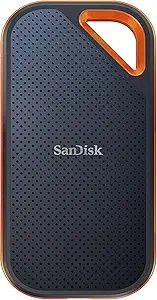 | Best rugged high-speed pick | Capacity: 1TB | Advertised speed: Up to 2,000MB/s | Interface: USB-C, USB 3.2 Gen 2×2 | VIEW ON AMAZON | See Our Full Breakdown |
| Lexar D70E 1TB Dual Drive External SSD |  | Best for switching between USB-C and USB-A | Capacity: 1TB | Read speed: Up to 2,000MB/s | Write speed: Up to 1,800MB/s | VIEW ON AMAZON | See Our Full Breakdown |
| SanDisk 1TB Extreme Portable SSD – USB-C, USB 3.2 Gen 2, IP65 Water and Dust Resistance |  | Best rugged value for everyday fast transfers | Capacity: 1TB | Read speed: Up to 1,050MB/s | Write speed: Up to 1,000MB/s | VIEW ON AMAZON | See Our Full Breakdown |
| Samsung T7 Portable SSD 1TB Titan Gray, USB 3.2 Gen 2, Up to 1,050MB/s |  | Best for broad everyday device compatibility | Capacity: 1TB | Color: Titan Gray | Interface: USB 3.2 Gen 2 | VIEW ON AMAZON | See Our Full Breakdown |
| external ssd high speed | Capacity | Interface | Read speed | Write speed |
|---|---|---|---|---|
| Fantom Drives Extreme 2TB Exte | 2TB | Thunderbolt 3 and 4; USB Type-C | — | — |
| SanDisk 1TB Extreme PRO Portab | 1TB | USB-C, USB 3.2 Gen 2×2 | — | — |
| Lexar D70E 1TB Dual Drive Exte | 1TB | — | Up to 2,000MB/s | Up to 1,800MB/s |
| SanDisk 1TB Extreme Portable S | 1TB | USB-C, USB 3.2 Gen 2 | Up to 1,050MB/s | Up to 1,000MB/s |
| Samsung T7 Portable SSD 1TB Ti | 1TB | USB 3.2 Gen 2 | Up to 1,050MB/s | Up to 1,000MB/s |
More Details on Our Top Picks
Fantom Drives Extreme 2TB External SSD – 2800MB/s, Thunderbolt 3 & 4, USB Type-C
The Fantom Drives Extreme takes the top spot for buyers whose setup can make use of its connection: it advertises up to 2,800MB/s, the highest stated speed in this group, and provides 2TB of storage rather than the 1TB offered by the other listed models. That combination is appealing for large video libraries, project folders, or frequent transfers where both capacity and throughput matter.
The catch is that its speed lead is conditional. The description calls out Thunderbolt 3 and 4 for optimal performance, so a USB-C-shaped port alone should not be treated as proof that a computer can deliver the same results. Compared with the SanDisk Extreme PRO and Lexar D70E, which advertise up to 2,000MB/s, the Fantom has more headroom and capacity but asks the buyer to check their host connection more carefully. Its aluminum enclosure and exFAT format add practical appeal across Windows and Mac workflows, though no included cable is specified. Choose it for a compatible workstation; skip it if you need assured peak speed from ordinary USB ports or want stated water and dust ratings.
Pros:- Highest advertised speed in this lineup: up to 2,800MB/s
- 2TB capacity for larger active projects and file collections
- Thunderbolt 3 and 4 compatibility, plus USB Type-C
- Aluminum enclosure and exFAT formatting
Cons:- Best performance depends on a Thunderbolt 3 or 4 port
- No included cable is specified in the supplied details
- No water or dust resistance rating is listed
Best for: Video editors and other creators with a Thunderbolt 3 or 4 computer who need 2TB and high advertised transfer rates.
Not ideal for: Buyers with only standard USB ports, anyone needing an explicit IP-rated enclosure, or those who need confirmation that a cable is included.
- Capacity:2TB
- Advertised speed:Up to 2,800MB/s
- Interface:Thunderbolt 3 and 4; USB Type-C
- Format:exFAT
- Enclosure:Aluminum
- Storage technology:3D NAND TLC
Our verdict“I rank the Fantom first for compatible Thunderbolt users because its 2TB capacity and 2,800MB/s claim outpace the rest, but its advantage depends on having the right host connection.”
SanDisk 1TB Extreme PRO Portable SSD – Up to 2000MB/s – USB-C, USB 3.2 Gen 2×2, IP65 Water and Dust Resistance
The SanDisk Extreme PRO is my strongest fit for someone who wants 2,000MB/s-class speed in a tougher portable drive. It combines a stated transfer rate up to 2,000MB/s with an aluminum chassis, IP65 water and dust resistance, and drop protection up to 3 meters. That is a more convincing travel package than the Fantom, which has a higher advertised speed and more capacity but no listed environmental rating.
Its main limitation is the connection requirement. This model specifies USB 3.2 Gen 2×2, so the result depends on compatible host hardware; a USB-C connector does not guarantee that a laptop supports the same bandwidth. The Lexar D70E also advertises a 2,000MB/s read rate and is more convenient for switching between USB-C and USB-A devices, but the SanDisk provides clearer ruggedness details and hardware encryption. File management through the Memory Zone app requires a software download, and the listed configuration is 1TB. For mobile work with exposure to dust, splashes, or drops, those tradeoffs can make sense; for maximum capacity or plug-and-play connections across older USB-A devices, another pick fits better.
Pros:- Advertised speeds up to 2,000MB/s
- IP65 water and dust resistance
- Drop protection up to 3 meters and forged aluminum chassis
- 256-bit AES hardware encryption
Cons:- Full speed depends on compatible USB 3.2 Gen 2×2 hardware
- File management features require a software download
- This listed model provides 1TB capacity
Best for: Mobile creators and field workers who want fast transfers, IP65 protection, and hardware encryption in a 1TB drive.
Not ideal for: People without a USB 3.2 Gen 2×2-capable host, buyers needing more than 1TB, or anyone who prefers not to install file-management software.
- Capacity:1TB
- Advertised speed:Up to 2,000MB/s
- Interface:USB-C, USB 3.2 Gen 2×2
- Water and dust resistance:IP65
- Drop protection:Up to 3 meters
- Encryption:256-bit AES hardware encryption
- Chassis:Forged aluminum
Our verdict“I recommend the Extreme PRO over the Lexar when stated ruggedness and encryption matter more than built-in USB-A access.”
Lexar D70E 1TB Dual Drive External SSD
The Lexar D70E gives up the SanDisk Extreme PRO’s listed IP65 protection in exchange for a distinctive convenience: integrated USB-C and USB-A connectors. Its advertised read speed reaches 2,000MB/s, with write speed up to 1,800MB/s, and its 55g metal body is designed for portable use without relying on a separate cable. That makes it a practical fit for moving files between a newer laptop and a device that still uses USB-A.
Compared with the Fantom, the D70E has less capacity and a lower stated speed ceiling, but it avoids the same specific Thunderbolt 3 or 4 dependency. It also differs from the standard SanDisk Extreme and Samsung T7 by advertising nearly twice their read-rate ceiling. Still, the speed claim only helps when the connected port and workload support it, and the supplied details do not give an IP rating or a drop rating. Automatic backups require an app, and this model is listed at 1TB. I’d choose it for connector flexibility and cable-free handling, not for outdoor protection or a larger project drive.
Pros:- Up to 2,000MB/s read and 1,800MB/s write speeds
- Built-in USB-C and USB-A connectors
- Compact metal housing weighs 55g
- Cable-free design for quick connections
Cons:- No water, dust, or drop rating is listed
- Automatic backups require an app
- This model is limited to 1TB capacity
Best for: People who regularly transfer files between USB-C and USB-A computers and want a compact, cable-free 1TB SSD.
Not ideal for: Buyers seeking stated water, dust, or drop protection, more than 1TB, or automatic backups without an app.
- Capacity:1TB
- Read speed:Up to 2,000MB/s
- Write speed:Up to 1,800MB/s
- Connectors:USB Type-C and USB Type-A
- Weight:55g
- Housing:Metal
Our verdict“The D70E is the most convenient high-speed pick for mixed USB-C and USB-A setups, though the rugged SanDisk models are better specified for rough travel.”
SanDisk 1TB Extreme Portable SSD – USB-C, USB 3.2 Gen 2, IP65 Water and Dust Resistance
The standard SanDisk Extreme makes a persuasive case for buyers who want a durable drive without chasing the highest number in the lineup. Its advertised read and write speeds are up to 1,050MB/s and 1,000MB/s, respectively—below the Extreme PRO and Lexar D70E, but still a useful class for portable file transfers when paired with a compatible USB 3.2 Gen 2 host. It also has IP65 water and dust resistance, drop protection up to 3 meters, and 256-bit AES hardware encryption.
Compared with the Samsung T7, it offers similar stated speed figures but adds explicit IP65 protection and a carabiner loop, making it the more travel-oriented choice. The T7, on the other hand, lists compatibility with PCs, Macs, Android devices, and gaming consoles, so it may be the easier general-purpose match for a broad range of devices. The standard SanDisk is not the right pick when frequent large transfers make 2,000MB/s-class claims valuable, and the listed model stops at 1TB. Its lack of an included carrying case is a small but relevant omission for buyers who want a complete travel kit.
Pros:- Up to 1,050MB/s read and 1,000MB/s write speeds
- IP65 water and dust resistance
- Drop protection up to 3 meters and a carabiner loop
- 256-bit AES hardware encryption
Cons:- Slower advertised ceiling than the Extreme PRO and Lexar D70E
- This listed configuration is limited to 1TB
- No carrying case is included in the supplied details
Best for: Travelers who need a protected, encrypted 1TB SSD for routine backups and transfers rather than the highest possible throughput.
Not ideal for: Users moving very large files frequently, buyers who need over 1TB, or anyone without a compatible USB 3.2 Gen 2 host and cable.
- Capacity:1TB
- Read speed:Up to 1,050MB/s
- Write speed:Up to 1,000MB/s
- Interface:USB-C, USB 3.2 Gen 2
- Water and dust resistance:IP65
- Drop protection:Up to 3 meters
- Encryption:256-bit AES hardware encryption
Our verdict“I’d pick the standard Extreme over the Samsung T7 when outdoor protection matters more than broad device compatibility or higher peak speed.”
Samsung T7 Portable SSD 1TB Titan Gray, USB 3.2 Gen 2, Up to 1,050MB/s
The Samsung T7 is the straightforward choice when reliable compatibility matters more than a record-setting speed claim. It advertises read speeds up to 1,050MB/s and write speeds up to 1,000MB/s over USB 3.2 Gen 2, putting it in a similar speed class to the standard SanDisk Extreme. Its stated support spans PCs, Macs, Android devices, and gaming consoles, which gives it a clear role for people who want one portable drive to move among different systems.
Where it loses ground to the SanDisk Extreme is outdoor protection: Samsung lists shock resistance and drop protection up to 6 feet, while the SanDisk adds an IP65 water and dust rating and protection from drops up to 3 meters. Neither is the speed leader; the Lexar and SanDisk Extreme PRO advertise rates up to 2,000MB/s, and the Fantom claims still more with a suitable Thunderbolt connection. The T7 is a more measured option for ordinary backups, media storage, and device-to-device transfers. Its performance still depends on the host port, and buyers need compatible cables to reach the intended speeds. It makes most sense as a broadly usable daily drive, not a rugged field SSD or a workstation-speed upgrade.
Pros:- Up to 1,050MB/s read and 1,000MB/s write speeds
- Compatibility listed for PCs, Macs, Android, and gaming consoles
- Shock-resistant design with drop protection up to 6 feet
- Compact portable 1TB format
Cons:- Slower advertised read rate than the 2,000MB/s-class models
- No IP water or dust rating is listed
- Optimal speed depends on compatible host ports and cables
Best for: Everyday users who want a 1TB portable SSD for PCs, Macs, Android devices, or gaming consoles and have compatible USB 3.2 Gen 2 connections.
Not ideal for: Buyers who prioritize IP-rated water and dust protection, need the highest transfer rates, or lack suitable cables and host ports.
- Capacity:1TB
- Color:Titan Gray
- Interface:USB 3.2 Gen 2
- Read speed:Up to 1,050MB/s
- Write speed:Up to 1,000MB/s
- Drop resistance:Up to 6 feet
- Compatibility:PC, Mac, Android, gaming consoles
Our verdict“The T7 is my everyday compatibility pick, while the standard SanDisk Extreme is a better match when protection from water and dust matters more.”

How We Picked
I ranked these five drives for people who specifically want a fast external SSD, not just portable storage. Advertised read and write rates set the initial speed comparison, but I also weighed whether the interface can support those rates on a buyer’s devices. A high figure has limited value when a drive needs a port the buyer does not have.
Capacity and physical practicality also shaped the order. The Fantom stands apart with 2TB and a 2,800MB/s claim, but that advantage is tied to Thunderbolt compatibility. The Lexar and SanDisk Extreme PRO advertise 2,000MB/s-class performance; Lexar emphasizes direct USB-A and USB-C connection, while SanDisk adds explicit IP65 and drop protection. The Samsung T7 and standard SanDisk Extreme have lower advertised ceilings, yet their more familiar USB 3.2 Gen 2 class can be a sensible match for ordinary compatible computers and mobile workflows.
I treated protection, encryption, and setup details as real buying factors rather than speed substitutes. Rugged ratings can matter when a drive travels, while hardware encryption may suit sensitive files. I did not assume every system reaches a product’s maximum rate, and I did not rank on price or customer ratings. These are specification-based comparisons; actual results vary with host support, cable, file size, and usage.
| external ssd high speed | Interface | Read speed | Write speed |
|---|---|---|---|
| Fantom Drives Extreme 2TB Exte | Thunderbolt 3 and 4; USB Type-C | — | — |
| SanDisk 1TB Extreme PRO Portab | USB-C, USB 3.2 Gen 2×2 | — | — |
| Lexar D70E 1TB Dual Drive Exte | — | Up to 2,000MB/s | Up to 1,800MB/s |
| SanDisk 1TB Extreme Portable S | USB-C, USB 3.2 Gen 2 | Up to 1,050MB/s | Up to 1,000MB/s |
| Samsung T7 Portable SSD 1TB Ti | USB 3.2 Gen 2 | Up to 1,050MB/s | Up to 1,000MB/s |
Factors to Consider When Choosing External Ssd High Speed
I’d choose an external SSD by matching its advertised speed to the ports and work I actually have, then checking capacity and protection. A fast label cannot overcome a slower connection, and durability can matter more than a short-lived benchmark advantage.Match the interface to your host
Start by checking the exact port on the computer, tablet, or phone that will use the drive. The Fantom’s 2,800MB/s claim is tied to Thunderbolt 3 or 4 for optimal performance; the SanDisk Extreme PRO lists USB 3.2 Gen 2×2, and the standard SanDisk Extreme and Samsung T7 use USB 3.2 Gen 2. Lexar’s USB-A and USB-C connectors help with physical compatibility, but connector shape alone does not establish the maximum transfer rate. Confirm the host’s supported USB or Thunderbolt standard and use an appropriate cable.
Treat maximum speed as a ceiling
Advertised transfer rates describe best-case capability, not a promise for every copy. Large sequential video files may behave differently from folders of small documents, and the computer’s port, cable, operating system, and drive workload can change the result. If transfers are a daily bottleneck, the 2,000MB/s-class Lexar or SanDisk Extreme PRO may offer useful headroom on compatible hardware. For general backups and media transfers, the Samsung T7 or standard SanDisk Extreme may already be a sensible speed class.
Choose enough capacity for active work
Four listed drives come in 1TB configurations; the Fantom is the 2TB option. Capacity affects how much can stay on hand without shuffling files to another disk. Video projects, photo libraries, and game collections can grow quickly, so think about the working set you need portable rather than only the size of your current files. Check the usable space shown by your operating system: formatted capacity and system conventions mean the available figure can differ from the nominal label.
Decide whether protection is part of the job
For a drive that travels in a bag or goes to outdoor locations, the ratings deserve attention. The two SanDisk models list IP65 water and dust resistance and drop protection up to 3 meters; the Samsung T7 lists shock resistance and drop protection up to 6 feet. The Lexar and Fantom details provided here do not state comparable water and dust ratings. A rating does not make a drive indestructible, so keep backups of important work even when an enclosure is rugged.
Weigh security and setup needs
The SanDisk Extreme PRO and standard Extreme specify 256-bit AES hardware encryption, which can appeal to buyers carrying sensitive files. The Extreme PRO’s file-management functions use the Memory Zone app, and Lexar’s automatic backup feature requires an app. If you prefer a minimal setup, check whether the software functions are optional for your workflow and whether the drive’s formatting suits your devices. The Fantom lists exFAT, a format often used for exchanging files across Windows and Mac systems, but buyers should still confirm compatibility for their own workflow.
Prioritize the feature you will notice most
If your bottleneck is large transfers on a Thunderbolt workstation, the Fantom’s speed and capacity lead this group. If you need a rugged fast drive, the Extreme PRO balances a 2,000MB/s claim with explicit protection. For mixed USB-A and USB-C connections, the Lexar removes the need to carry a separate cable. Buyers who value general compatibility can favor the Samsung, while travelers wanting a slower but protected drive can choose the standard SanDisk Extreme. Pick for the limiting factor in your own setup, not for the biggest number in isolation.
Frequently Asked Questions
Which of these external SSDs has the highest advertised speed?
The Fantom Drives Extreme lists speeds up to 2,800MB/s, the highest figure in this group. Its best performance depends on a Thunderbolt 3 or 4 port, so I would verify the computer’s connection before choosing it for speed. The SanDisk Extreme PRO and Lexar D70E advertise up to 2,000MB/s, while the Samsung T7 and standard SanDisk Extreme list read speeds around 1,050MB/s.
Will a USB-C port let any of these drives reach its maximum speed?
No. USB-C describes the connector shape, not the bandwidth standard supported by the device. The host port, cable, and drive interface all need to support the relevant connection. This matters especially for the Fantom’s Thunderbolt performance and the SanDisk Extreme PRO’s USB 3.2 Gen 2×2 rating. I’d check the computer’s technical specifications rather than assume a USB-C port can provide the fastest result.
Which model is best suited to travel and outdoor work?
The SanDisk Extreme PRO and standard SanDisk Extreme have the clearest environmental protection details here: both list IP65 water and dust resistance and drop protection up to 3 meters. The Extreme PRO has a higher advertised speed ceiling, while the standard Extreme is in the 1,050MB/s read class. The Samsung T7 lists drop protection up to 6 feet but does not list an IP water and dust rating in the supplied details.
Is the 2TB Fantom a better choice than a 1TB drive?
It is a stronger fit if you need more space for active projects and have a compatible Thunderbolt 3 or 4 computer to use its advertised speed. The other products in this lineup are listed as 1TB models, which can suit lighter libraries and routine transfers. I would choose based on both working capacity and host connection: extra space does not make the Fantom’s peak speed available through every USB-C port.
Are the advertised transfer speeds guaranteed during file copies?
No. Maximum figures are advertised ceilings, and actual transfer rates vary with the host device, port standard, cable, file sizes, workload, and other operating conditions. A compatible connection is necessary, but real copies may still fall below the listed number. For a realistic choice, match the SSD to your computer and typical tasks rather than treating a maximum speed claim as a guaranteed everyday result.
Conclusion
For Thunderbolt-equipped creators who need 2TB, I’d choose the Fantom Drives Extreme, accepting its connection dependency and missing stated environmental rating. For field work where fast transfers need to share space with protection, the SanDisk Extreme PRO is my pick. Choose the Lexar D70E if switching between USB-A and USB-C matters most; its connector flexibility is the lineup’s practical distinction.
If your routine calls for a portable drive with broad device support, I’d favor the Samsung T7. If you want a similar everyday speed class with explicit water, dust, and drop protection, the standard SanDisk Extreme is the better match. Before deciding, check your host port, required capacity, and travel conditions: those three details will matter more than a speed claim your setup cannot use.