
To make your pans look professional, you need to master the drag adjustment on your fluid-head tripod. This controls the resistance you feel when moving the camera, allowing smooth, controlled motions instead of shaky or jerky ones. Adjusting the drag lets you fine-tune how slowly or quickly your camera pans, giving your footage that polished, cinematic look. Keeping this control properly set is key—continue exploring how to optimize it for stellar results.
Key Takeaways
- Adjust the drag control knob to set the resistance level for smooth, controlled camera pans.
- Increase drag for slow, cinematic movements; decrease for faster, dynamic shots.
- Proper drag settings prevent jerky motions and ensure professional-looking footage.
- Regularly fine-tune the drag to match shot requirements and maintain optimal control.
- Mastering drag adjustment enhances shot stability and creates polished, cinematic pans.

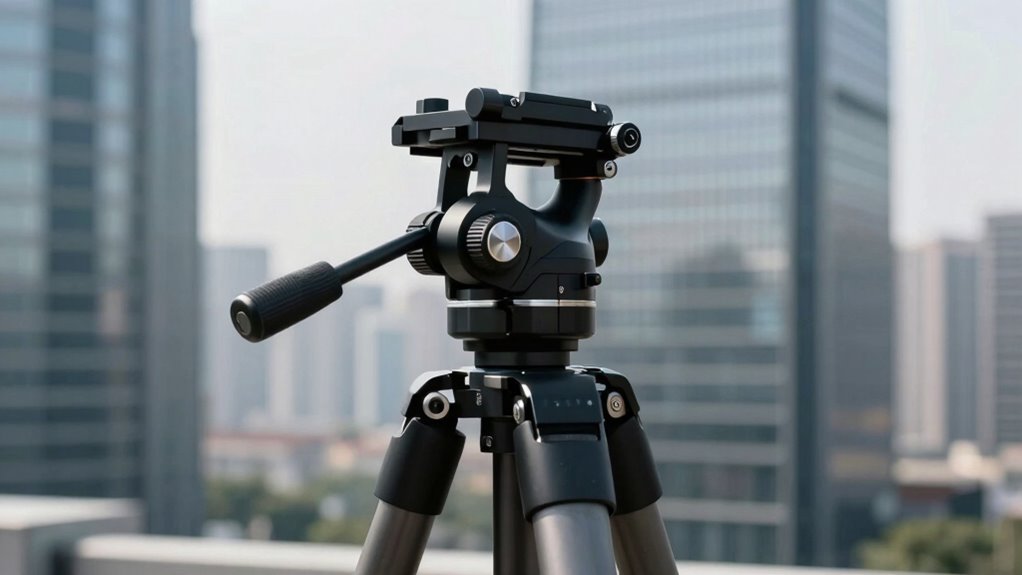
Fluid-head tripods are essential tools for videographers and photographers who need smooth, precise camera movements. When capturing dynamic scenes or aiming for professional-looking pans, a fluid head provides the camera stabilization you require. Unlike standard tripods, fluid heads incorporate a damping mechanism that allows you to control the speed and resistance of your camera movements, making your panning and tilting actions appear seamless and natural. This feature is vital for producing high-quality footage that looks polished and professional, especially when you’re working on projects where visual smoothness counts.
To get the most out of your fluid-head tripod, understanding how to perform proper tripod maintenance is key. Regular upkeep ensures the fluid mechanism functions smoothly over time and prevents annoying jerks or resistance that can ruin your shot. Keep the fluid head clean by wiping off dust and debris after each use, and periodically check for leaks or dried-out fluid that might hinder performance. Lubricate moving parts as recommended by the manufacturer, and tighten any loose screws or knobs to maintain stability. These small maintenance steps preserve the tripod’s ability to deliver consistent camera stabilization, which is crucial for achieving those professional-quality pans and tilts. Additionally, maintaining proper fluid mechanism is essential for consistent performance during long shoots.
Adjusting the drag on your fluid head is a straightforward process that significantly improves your control over camera movement. Most fluid heads feature a drag adjustment knob or dial, allowing you to fine-tune the resistance to match your shot’s requirements. For smooth, slow pans, increase the drag to add resistance, making your movements more controlled and preventing unwanted jerks. For faster motions, decrease the drag to allow easier, quicker camera shifts. Proper drag adjustment is what makes your pans look deliberate and professional—avoiding overly rapid or shaky motions that can distract viewers. When you master this adjustment, you’re able to smoothly follow subjects or create cinematic effects with minimal effort.
Frequently Asked Questions
How Do I Properly Calibrate the Drag Adjustment?
To properly calibrate the drag adjustment, start by balancing the tripod head so it holds steady at your desired position. Then, turn the tension calibration knob slowly until the pan movement feels smooth and controlled without being too stiff. Adjust the balance as needed, ensuring the drag provides consistent resistance across the full range of motion. Fine-tune until you achieve a fluid, professional-looking pan.
What Is the Ideal Drag Setting for Smooth Pans?
You want smooth pans that feel natural, so set your drag just enough to maintain balance control without resisting movement. Imagine the perfect weight distribution—too tight, and your shot feels stiff; too loose, and it’s unsteady. The ideal setting offers a seamless flow, allowing your camera to glide effortlessly. Adjust gradually, testing each time, until you find that sweet spot where your pans move fluidly, like a professional’s.
Can Drag Adjustment Affect Tripod Stability?
Yes, drag adjustment can affect tripod stability. When you set the drag too tight, it can put extra strain on the tripod’s fluid head, especially if your tripod is lightweight, making it less stable. Conversely, a too-loose setting may cause unwanted movement. To improve user experience, find a balance that supports your tripod’s weight and allows smooth, controlled pans without compromising stability.
How Often Should I Maintain the Drag Mechanism?
You should maintain the drag mechanism every 6 to 12 months to prevent common issues like stiffness or uneven movement. Regular maintenance tips include cleaning the fluid head, checking for leaks, and lubricating moving parts. By staying on top of these tasks, you guarantee smooth panning and prolong your tripod’s lifespan. Neglecting maintenance can lead to decreased stability and compromised shot quality, so make it a routine part of your gear care.
Are There Different Types of Drag Systems for Various Cameras?
Yes, there are different drag systems designed for various cameras, ensuring perfect camera compatibility and smooth gear customization. Think of it as tailoring your gear to fit your camera like a glove—whether you’re shooting a tiny mirrorless or a massive cinema camera. These systems can be adjusted to handle the weight and balance, making your pans look professional without breaking a sweat. So, pick the right drag system, and your shots will look cinematic!
Conclusion
Now that you know about fluid-head tripods and their drag adjustment, you’re ready to capture smooth, professional-looking pans. Think of the drag control as the steady hand guiding your shot, like a skilled dancer maintaining perfect balance. With this feature, your videos will look polished and cinematic, even if you’re just starting out. So, take control of your camera, fine-tune the drag, and let your creativity flow effortlessly—your shots will speak volumes.