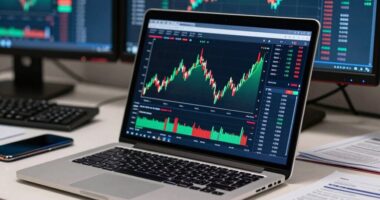
A 49-inch ultrawide monitor helps you organize your charts, data streams, and tools in a clear, streamlined layout. By maximizing screen space, you can view multiple market indicators simultaneously without clutter, making complex analysis much easier. Proper calibration and ergonomic setup enhance visibility and reduce fatigue during long sessions. This layout trick boosts your trading efficiency, giving you quick access to all essential information. Continue exploring to discover tips that optimize your trading environment even further.
Key Takeaways
- Use split-screen or picture-in-picture modes to organize multiple charts and data streams clearly.
- Apply consistent color calibration to ensure accurate and easily distinguishable chart indicators.
- Position the monitor at eye level with proper tilt to reduce glare and enhance readability.
- Customize chart layouts with larger fonts and clear grid lines for quick data interpretation.
- Group related charts and tools logically to minimize clutter and streamline decision-making.

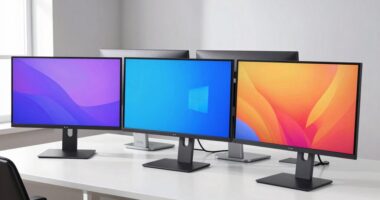
If you’re looking to boost your trading efficiency, a 49-inch ultrawide monitor can be a game-changer. Its expansive screen real estate allows you to view multiple charts, data streams, and tools simultaneously, reducing the need to toggle between tabs or windows. This setup streamlines your workflow, helping you make quicker, more informed decisions. To maximize these benefits, paying attention to color calibration is essential. Accurate color representation ensures that your charts, indicators, and graphs display precisely as intended, minimizing misinterpretations caused by distorted hues or contrast issues. When your monitor is properly calibrated, you can distinguish subtle shifts in color that might signal important market movements, giving you an edge in fast-paced trading environments.
Beyond visual clarity, an ergonomic setup plays a key role in maintaining your focus and comfort during long trading sessions. Positioning your ultrawide monitor at eye level, with the correct tilt and distance, prevents strain on your neck, back, and eyes. This setup reduces fatigue, so you stay alert and attentive throughout the day. An ergonomic approach also involves organizing your workspace to minimize clutter and distractions. Keep essential tools within easy reach, and consider adjustable stands or mounts that allow you to customize the monitor’s height and angle for ideal viewing. This setup not only enhances comfort but also helps you maintain better posture, which is essential if you spend hours analyzing charts. Additionally, understanding the importance of display calibration can significantly improve your visual experience and decision-making accuracy on large screens.

KNAON Bluetooth Thermal Shipping Label Printer, 4x6 Portable Thermal Address Label Printer for Small Business, Compatible with iPhone,Android,Windows,Mac–Works with Etsy Shopify USPS&More, White
Bluetooth Wireless Connection: KNAON Bluetooth shipping label printer enables wireless printing. For iOS and Android users, need to...
As an affiliate, we earn on qualifying purchases.
Frequently Asked Questions
How Do Ultrawide Monitors Affect Multi-Monitor Workflows?
Ultrawide monitors boost your multitasking efficiency by consolidating multiple screens into one seamless workspace, reducing clutter and distraction. You can organize your charts, data, and tools side-by-side without constantly switching windows. This setup streamlines your workflow, making it easier to analyze information quickly. Plus, it minimizes the need for multiple monitors, saving space and creating a more focused environment, ultimately enhancing your productivity.
Are 49-Inch Monitors Suitable for Gaming Alongside Trading Tasks?
Yes, a 49-inch monitor can be great for gaming alongside trading tasks. It offers excellent gaming compatibility, ensuring smooth performance for most titles. The wide screen enhances visual immersion, making your gaming experience more engaging. You won’t have to switch between screens frequently, which helps maintain focus on your trades. Just make sure your GPU can handle the resolution to enjoy seamless visuals during both gaming and trading sessions.
What Are the Power Consumption Considerations for Large Ultrawide Displays?
Think of your ultrawide monitor like a fuel-efficient car; it’s powerful but uses energy wisely. Larger displays tend to consume more power, impacting your energy costs and efficiency. To keep costs down, look for models with energy-saving features like adaptive brightness or power management modes. You’ll enjoy your expansive workspace without draining your wallet, just like a well-tuned vehicle that balances performance with fuel economy.
Can These Monitors Be Mounted on Adjustable Arms Easily?
Yes, these monitors can be mounted on adjustable arms easily, providing excellent mounting flexibility. You can customize your ergonomic setup by adjusting the height, tilt, and swivel to reduce strain and improve comfort during long trading sessions. Just verify your monitor’s VESA compatibility and weight capacity match your mount’s specifications. With the right setup, you’ll enjoy a more comfortable, efficient workspace tailored to your needs.
How Do Ultrawide Monitors Impact Eye Strain Over Long Trading Sessions?
Ultrawide monitors can reduce eye fatigue during long trading sessions by providing a broader view, so you don’t have to constantly switch between windows. They enhance visual comfort with larger screens, reducing the strain from squinting or shifting focus. However, to prevent eye strain, make sure to adjust brightness, contrast, and take regular breaks. Proper positioning and good lighting also help maintain your visual comfort over extended periods.

Bluetooth Thermal Shipping Label Printer: 4x6 Wireless Label Maker with Tape for Small Business - Compatible with iPhone, Android, Windows & Mac, Widely Used for USPS UPS Ebay Amazon Shopify Etsy
Multi-Label Size Support: Supports thermal labels with a width of 1.57" to 4.3", Compatible with 4x6, 3x2, and...
As an affiliate, we earn on qualifying purchases.
Conclusion
With a 49-inch ultrawide monitor, you’ll find that bigger truly is better—giving you the space to see everything clearly and make smarter trades. It’s like having a bird’s-eye view, where no detail slips through the cracks. Remember, “A picture is worth a thousand words,” and in trading, clear visuals can mean the difference between success and a missed opportunity. Embrace the layout trick, and watch your charts come to life.

Tapo 2K Wireless Smart Video Doorbell with Chime - 160° Ultra-Wide View,Person Detection, Ring Call, 2-Way Audio, Subscription-Free Local Storage/Optional Cloud, Motion Only Alert, D210
【2K Resolution】Details matter. Equipped with 2K resolution, see beyond traditional 1080p resolution with finer details and incredible clarity....
As an affiliate, we earn on qualifying purchases.

Nelko Bluetooth Thermal Shipping Label Printer, Wireless 4x6 Shipping Label Printer for Shipping Packages, Support Android, iPhone and Windows, Widely Used for Amazon, Shopify (Black)
Go Wireless by Bluetooth: Download the "NELKO"app to print via Bluetooth on your Nelko Bluetooth thermal label printer...
As an affiliate, we earn on qualifying purchases.