This checklist is for people organizing cryptocurrency and Bitcoin tax records, receipts, and supporting documents. It can help you think through the supplies that may make record keeping more organized and easier to manage.

Get hardware and tech essentials delivered free with Prime
- Fast, free delivery on millions of items
- Prime Video, Amazon Music and more included
- Member-only deals all year
The sections cover storage, scanning, printing, and document protection, followed by privacy screen advice without a specific product pick. Each product slot focuses on what to check before deciding whether an item suits your setup.
Use the checklist to compare features with your own devices, documents, and workspace. Confirm compatibility and capacity from current product information before buying, and choose the items that address your biggest record keeping needs first.
Encrypted USB Drive
An encrypted USB drive can give you a dedicated place to carry tax documents and other records. The listed pick is the Apricorn Aegis Padlock 2TB Hardware-Encrypted Portable External Hard D. Before choosing it, check how it connects to your computer and whether its security controls fit the way you plan to use it. A drive used across several devices should work with each of them.
A common mistake is assuming that storage capacity or the word “encrypted” answers every practical question. Confirm the usable capacity, supported operating systems, connection type, and setup requirements in the current product details. Consider whether you need a portable drive for transfers or a device that stays with your records. For tax files, keep a separate backup plan and avoid relying on a single storage location. Test access and backups before making the drive your only copy of important documents.
What to look for:
- Confirm the supported connection type for your devices.
- Check operating system compatibility.
- Review the setup and access instructions.
- Match the capacity to the files you plan to store.
- Plan a separate backup location.
Apricorn Aegis Padlock 2TB Hardware-Encrypted Portable External Hard Drive

This portable 2TB drive uses 256-bit AES XTS hardware encryption and an integrated keypad for PIN-based access. It connects over USB 3.0, requires no software or administrator rights, and supports up to five user PINs plus an administrator PIN.
Pros:
- Hardware encryption with keypad-based PIN access
- Works without software installation or administrator rights
- Compatible with PC, Mac, and USB-enabled operating systems
- Rugged design with epoxy coating and brute-force self-destruct feature
Cons:
- Uses a rotating 5400 rpm hard drive
- Requires PIN entry through the integrated keypad
Best for: People who want portable storage for tax records.
Not ideal for: Anyone whose devices do not support its connection or setup.
Bottom line: Check compatibility and establish a backup plan before storing your only copy of tax records here.
Document Scanner
A document scanner can help turn paper receipts and records into files you can organize with your tax materials. The listed pick is the Doxie Pro Duplex Document and Receipt Scanner. Duplex scanning may be useful when documents have information on both sides, while receipt scanning speaks to a paper trail that can include many small documents. Check the product details to understand its supported document sizes and software requirements.
One common mistake is choosing a scanner without considering where the resulting files will go. Confirm that its software works with your computer and that you can save scans in a format and location that fit your filing habits. Check how it handles mixed document sizes and whether its feed approach suits the condition of your receipts and paperwork. For delicate or unusual documents, review the product guidance before feeding them. Try a sample batch and inspect the resulting files before relying on a scanning workflow for a full season of records.
What to look for:
- Verify software and operating system compatibility.
- Check supported paper and receipt sizes.
- Confirm how duplex scanning is handled.
- Review available file formats and save options.
- Consider the condition and variety of your paperwork.
Doxie Pro Duplex Document and Receipt Scanner

A compact wired scanner that captures two-sided documents, receipts, business cards, photos, and more. Its software supports text recognition, automatic cropping, rotation, contrast adjustment, and sharing scans with apps such as Dropbox, Evernote, OneNote, and iCloud.
Pros:
- Scans both sides of a page automatically
- Compact design for home or office use
- Software includes text recognition and image adjustments
- Can scan a variety of materials, including receipts and photos
Cons:
- Wired USB connectivity
- Document feeder holds up to 20 sheets
Best for: People digitizing receipts and two-sided paperwork.
Not ideal for: Anyone needing a scanner workflow unsupported by its software.
Bottom line: Check software compatibility and test a representative mix of documents before settling on a scanning process.
Laser Printer
A printer can be useful when you need paper copies of tax records, forms, or supporting documents. The listed pick is the Brother HL-L3280CDW Wireless Compact Digital Color Printer with Laser. Its name identifies wireless connectivity and color printing, but you should confirm the exact features and requirements in the current product information. Check that it can connect to the devices and network you intend to use.
A common buying mistake is focusing on the printer alone and overlooking supplies, paper handling, and the way it fits into a home office. Review supported paper sizes, connection options, compatible supplies, and setup requirements. If you expect to print only occasionally, consider how you will keep the printer ready for use and whether color output is useful for your records. For sensitive tax documents, think about where printouts will sit and who can access them. Check the whole workflow, from sending a file to collecting and storing the printed page.
What to look for:
- Confirm device and wireless network compatibility.
- Review supported paper sizes and handling.
- Check compatible supplies and setup requirements.
- Decide whether color output suits your documents.
- Plan where sensitive printouts will be collected and stored.
Brother HL-L3280CDW Wireless Compact Digital Color Printer with Laser Quality Ou

The Brother HL-L3280CDW is a compact wireless color laser printer ideal for small and home offices. It offers fast print speeds up to 27 ppm, automatic duplex printing, and the ability to print from cloud-based apps via a 2.7" touchscreen.
Pros:
- High-quality laser color printing
- Fast print speeds
- Automatic double-sided printing
- Easy cloud printing via touchscreen
Cons:
- Limited to small office/home use
- Subscription trial may require renewal
- No mention of scanning or copying features
Best for: People who want to print tax documents in color.
Not ideal for: Anyone without a compatible device or suitable network setup.
Bottom line: Confirm connectivity, supplies, and paper handling before adding this printer to your record keeping workflow.
Fireproof Document Bag
A document bag can keep paper records gathered in one place when you need to move or store them. The listed pick is the Fireproof Backpack Combo – UL 94 V-0 & NFPA 701 Go Bag, 20L, Water-Res. Its name includes fire-related and water-resistance descriptions; check the current product documentation to understand exactly what those statements cover and how the bag is intended to be used.
A common mistake is treating a protective bag as a substitute for organized storage or a digital backup. Check the interior dimensions against the folders and documents you plan to carry, and confirm how it closes and is carried. The listed capacity is 20L, but that alone does not establish whether your specific binders or papers will fit. Review the product’s care and use guidance, including any limits on protection. Keep important records backed up separately and arrange papers so they can be retrieved without unpacking everything. Measure your documents and compare them with the bag’s current specifications before choosing it.
What to look for:
- Compare interior dimensions with your folders and papers.
- Confirm what the protection claims cover.
- Review closure and carrying details.
- Check the current care and use instructions.
- Keep a separate backup of important records.
Fireproof Backpack Combo – UL 94 V-0 & NFPA 701 Go Bag, 20L, Water-Resistant Eme
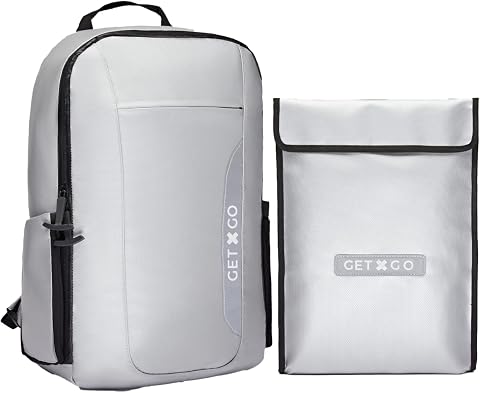
This fireproof backpack is designed for emergency situations, offering protection against temperatures up to 1832°F. Made with triple-layer silicone-coated fiberglass, it is water-resistant, discreet, and includes multiple compartments for organizing essential survival gear.
Pros:
- Highly fire-resistant, withstands up to 1832°F
- Water-resistant and discreet design
- Multiple compartments for organized storage
- Lightweight and compact for easy carrying
Cons:
- No specific dimensions provided
- Limited capacity for larger items
- Price not specified
Best for: People who want to gather documents in a carryable bag.
Not ideal for: Anyone needing verified protection beyond the product’s documented limits.
Bottom line: Check dimensions and documented use limits, and keep a separate backup of important records.
Privacy Screen Filter
A privacy screen filter is an advice-only slot for people who review tax records on a laptop or monitor in shared spaces. Because no product is specified, compare filters by the screen dimensions and aspect ratio of your display. Check the exact model of your device and whether the filter attaches in a way that suits your screen and how you work.
A frequent mistake is selecting by diagonal size alone: dimensions, bezel shape, touchscreen use, and attachment style can affect fit. Review the filter maker’s compatibility guidance, visibility characteristics, and any effect on screen brightness or clarity. If you move between devices, one filter may not fit all of them. Consider whether a filter is practical for your normal viewing angle and whether you can remove or reposition it as needed. Measure the display area and check the fit instructions before ordering.
What to look for:
- Match exact screen dimensions and aspect ratio.
- Check compatibility with your device model and bezel.
- Review attachment and removal methods.
- Consider touchscreen use and viewing angle.
- Check stated effects on brightness and clarity.
External SSD
An external SSD can provide a place to keep a larger collection of digital tax records and related files. The listed pick is the Samsung T9 Portable SSD 4TB. Check the drive’s current connection and compatibility details against your computer, and consider whether its stated capacity suits the files you plan to retain. A portable drive can support a file organization routine, but you will still need a reliable backup approach.
A common mistake is treating a large drive as a complete backup strategy. Confirm supported connections and operating systems, review any included software or setup guidance, and think through how you will label and organize folders. Make sure your backup process includes checking that copies can be opened and restored. If you need to move files between different devices, confirm that each device can connect to and read the drive. Test the full transfer process before placing your records on it, and keep another copy in a separate location.
What to look for:
- Verify connection type across all intended devices.
- Check operating system support.
- Match capacity to your planned file collection.
- Review setup guidance and included software.
- Create and periodically check a separate backup.
Samsung T9 Portable SSD 4TB

The Samsung T9 Portable SSD offers up to 4TB of storage with sustained read and write speeds of up to 2,000 MB/s via USB 3.2 Gen 2×2. It features Dynamic Thermal Guard to manage heat during heavy use and includes AES 256-bit hardware encryption for security.
Pros:
- Extremely fast transfer speeds up to 2,000 MB/s
- High capacity of 4TB suitable for large media projects
- Advanced thermal management keeps the drive cool during heavy use
- Broad compatibility with modern devices including iPhone and gaming consoles
Cons:
- Maximum speeds require specific USB 3.2 Gen 2×2 host support
- Enclosure material details are not specified
Best for: People keeping a substantial digital records library.
Not ideal for: Anyone whose devices lack a compatible connection.
Bottom line: Confirm compatibility and test file recovery while maintaining a separate backup copy.
Start with the items that solve your biggest record keeping gaps: a way to capture paper documents, a place to organize digital files, or a method to print and carry paperwork. Then compare storage options and privacy accessories with your current devices and workflow. You can build the checklist gradually instead of buying every category at once.
Keep the routine simple: save files consistently, maintain a separate backup, and make sure you can retrieve records when needed. Check fit, connections, and product instructions before committing. A few well-matched tools can make tax document preparation feel more manageable.
Columbus Day / Indigenous Peoples' Day Picks
long weekend sales
As an affiliate, we earn on qualifying purchases.