
This checklist is for people organizing a crypto and Bitcoin desk who want to think through account access, screen privacy, file storage, power continuity, and physical storage. Use each section to decide which parts of your setup need attention.

Get hardware and tech essentials delivered free with Prime
- Fast, free delivery on millions of items
- Prime Video, Amazon Music and more included
- Member-only deals all year
The checklist moves from account protection to devices and workspace considerations, then to backup and signal-blocking options. Some slots include a named pick; others offer advice only, so you can compare suitable options for your own setup.
Use the look-for points to check compatibility and fit before buying. Read each pick’s specifications, confirm it suits your devices and intended use, and treat physical storage products as storage choices rather than substitutes for a secure backup plan.
Hardware Security Key
A hardware security key can be part of a two-factor authentication setup for accounts that support it. Before choosing one, check the sign-in methods supported by the services you use and whether they accept the key’s protocols. The listed pick is a FIDO2 security key with a MIFARE DESFire NFC smart card, but the product name alone does not establish which accounts or devices it supports. A common buying mistake is assuming that any key works with every login flow. Confirm connection options, enrollment steps, and whether you need NFC or another way to connect. Check the manufacturer’s instructions for supported platforms and whether you can register a backup key. Keep recovery methods accessible and protected; a key is useful only if you can use it when you need to sign in. Make sure the form factor suits your routine, such as carrying it or keeping it near your desk, and consider how you will avoid losing or damaging it. Verify these details against the exact product listing before relying on it for account access.What to look for:
- Confirm that the accounts you use support FIDO2 security keys.
- Check device and operating-system compatibility in the product specifications.
- Verify how the key connects, including NFC support if needed.
- Review enrollment, recovery, and backup-key guidance.
- Choose a form factor that fits your daily use and storage habits.
FIDO2 Security Key with MIFARE DESFire NFC Smart Card for 2FA MFA

This security key supports FIDO2 v2.1, U2F, and CTAP1 for secure two-factor authentication and passwordless sign-in. It features a MIFARE DESFire EV2 card for physical access control, with AES encryption and a tamper-resistant secure element.
Pros:
- Supports multiple authentication standards for versatile security
- Combines digital and physical access in one card
- Certified secure element with tamper resistance
- Swiss-engineered design with reliable warranty
Cons:
- Requires compatible services and physical access systems
- May be complex for users unfamiliar with smart cards
Best for: People whose accounts support the listed key’s authentication methods
Not ideal for: Anyone who has not confirmed account and device compatibility
Bottom line: Confirm supported sign-in methods and keep recovery options protected before making this key part of your setup.
Privacy Screen Filter
A privacy screen filter is an optional desk accessory to consider if your display is visible to people nearby. The right choice depends on the monitor or laptop you use and how you work: a filter needs to fit the screen, align with its dimensions, and remain practical for your viewing position. No specific product is named for this slot, so use the checklist to compare options for your own display. A frequent mistake is choosing by screen size label alone. Check the manufacturer’s measurements and attachment method, then confirm the filter is intended for your exact display shape and usable area. Consider whether you need to remove it often and how it attaches without interfering with a webcam, bezel, or touchscreen. Review care instructions and any stated effect on brightness or viewing angle. A filter does not secure accounts or files; it addresses only the visibility of the screen. If you share a workspace, assess the actual lines of sight before deciding whether one suits your desk.What to look for:
- Match the filter’s measurements to the visible screen area.
- Check compatibility with your display’s shape and bezel.
- Review attachment and removal methods for your setup.
- Consider viewing position and any stated display effects.
- Look for care instructions that suit your routine.
Encrypted USB Drive
A hardware-encrypted drive can provide a dedicated place for portable file storage, but the right choice depends on what you need to store and how you access it. The listed pick is an Apricorn Aegis Padlock 2TB hardware-encrypted portable external hard drive. Its name identifies the stated capacity and product type; verify the exact specifications and supported devices in the listing before purchase. A common mistake is overlooking connection and access requirements. Confirm the drive’s interface works with your computer, and review how its keypad or other access controls operate. Consider whether the device’s size and portability fit your routine, where it will be stored, and how you will maintain a separate recovery plan for important files. Do not assume that an encrypted drive alone guarantees that files are recoverable: check the manufacturer’s instructions for setup, authentication, and data recovery limitations. If you plan to store sensitive account or wallet-related files, decide which files belong on the drive and protect any associated credentials separately. Treat the product name as a starting point, then check current product documentation.What to look for:
- Verify the listed capacity and exact model details.
- Check the drive interface against your computer’s ports and operating system.
- Review keypad, authentication, and setup instructions.
- Understand data recovery limitations before storing important files.
- Plan separate, protected storage for recovery information.
Apricorn Aegis Padlock 2TB Hardware-Encrypted Portable External Hard Drive

This portable 2TB drive uses 256-bit AES XTS hardware encryption and an integrated keypad for PIN-based access. It connects over USB 3.0, requires no software or administrator rights, and supports up to five user PINs plus an administrator PIN.
Pros:
- Hardware encryption with keypad-based PIN access
- Works without software installation or administrator rights
- Compatible with PC, Mac, and USB-enabled operating systems
- Rugged design with epoxy coating and brute-force self-destruct feature
Cons:
- Uses a rotating 5400 rpm hard drive
- Requires PIN entry through the integrated keypad
Best for: People seeking a portable hardware-encrypted drive for compatible devices
Not ideal for: Anyone who has not checked connection and recovery requirements
Bottom line: Confirm model, compatibility, and recovery procedures before entrusting important files to the drive.
Metal Seed Phrase Storage
Seed phrase storage calls for careful product evaluation, because the listed item is a metal garage storage cabinet with wheels, locking doors, and adjustable shelves—not a product identified by name as a seed phrase storage device. The name alone does not establish that it protects a seed phrase, fits a particular backup format, or provides any specific security properties. Treat this pick as a cabinet and assess whether it actually meets your intended storage needs. A common buying mistake is equating a lockable cabinet with protection for sensitive backup material. Check dimensions, shelf layout, locking details, and how the cabinet fits the intended location. Consider whether wheels and adjustable shelves suit your space and whether the item can be secured as you expect. For a seed phrase, evaluate a purpose-built storage method and follow the wallet provider’s backup guidance; avoid assuming that a general-purpose cabinet provides the properties of a dedicated backup product. Keep access limited and plan how you would retrieve the backup when needed. Verify the full product description and do not place sensitive information in a cabinet until you have a clear, suitable storage plan.What to look for:
- Confirm the product’s dimensions and shelf arrangement.
- Review the listed locking mechanism and how it is used.
- Check whether wheels suit the intended location and storage plan.
- Look for a purpose-built seed phrase storage method if needed.
- Follow wallet provider guidance for backup and recovery.
Metal Garage Storage Cabinet with Wheels, Locking Doors, and Adjustable Shelves,
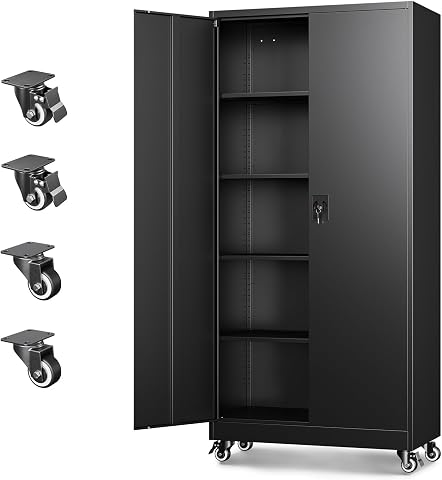
This steel storage cabinet has a powder-coated finish designed to resist moisture, corrosion, and rust. It includes four adjustable shelves, a three-point locking system, and detachable swivel wheels, and can be wall-mounted using pre-drilled holes.
Pros:
- Powder-coated steel is designed to resist moisture, corrosion, and rust.
- Four adjustable shelves provide flexible storage.
- Detachable 360° swivel wheels make the cabinet easier to move.
- Three-point locking system and wall-mounting holes offer added security and stability.
Cons:
- Requires assembly, estimated at approximately 30 minutes.
- The listed shelf capacity is limited to 180 lbs.
Best for: People seeking a general storage cabinet after verifying its features
Not ideal for: Anyone expecting the product name to establish seed phrase protection
Bottom line: Evaluate this as a cabinet and choose a suitable backup method based on your wallet guidance.
Uninterruptible Power Supply
An uninterruptible power supply is an equipment-planning choice for a desk with devices that may need temporary power during an interruption. No specific product is named here, so begin by listing the equipment you intend to connect and checking its power requirements. The appropriate configuration depends on those devices and how you plan to use them. A common buying mistake is choosing without checking the connected load, outlet layout, and runtime information. Compare the UPS specifications with the requirements of your computer, network equipment, or other intended devices. Review which outlets provide battery backup and which offer surge protection, plus any setup or maintenance guidance. Consider the unit’s physical dimensions, placement, and access to its controls. Do not infer runtime from a product category alone; consult the manufacturer’s documentation for the equipment and conditions that matter to your setup. If continuity is important, decide in advance which devices matter most and connect accordingly.What to look for:
- List the devices you intend to connect and their power requirements.
- Compare the UPS output specifications with the intended load.
- Check which outlets provide battery backup and surge protection.
- Review manufacturer runtime guidance for your expected setup.
- Confirm dimensions and placement work at your desk.
Faraday Signal Blocking Pouch
A signal-blocking pouch may suit someone who wants a place to carry a phone while considering signal isolation. The listed pick is the Faraday Defense Jacket Pro Vertical XL signal-blocking phone pouch. Its name gives a model description, but it does not establish compatibility with a particular phone or the performance you can expect in your circumstances. Check the product details and instructions before relying on it. A common mistake is overlooking the phone’s dimensions or assuming that a pouch’s label guarantees fit. Compare the pouch’s stated internal measurements with your phone, including any case you plan to keep on it. Review how the pouch closes and how the manufacturer says to use it. Consider whether the vertical XL form factor suits how you carry or store your device. If you intend to use the pouch for a specific purpose, confirm that the manufacturer’s documentation addresses that use. Think through how you will access the phone when needed, since placing it inside may affect connectivity according to the product’s intended function. Check return and support details in the listing if fit is uncertain.What to look for:
- Compare internal pouch measurements with your phone and case.
- Verify the exact model and intended use in product documentation.
- Review how the pouch closes and how it should be used.
- Check whether the vertical XL form factor fits your carrying routine.
- Plan when you need to access the phone while it is stored.
Faraday Defense Jacket Pro Vertical XL Signal-Blocking Phone Pouch

This vertical Faraday pouch uses layered nickel-and-copper shielding to block cellular, Wi-Fi, Bluetooth, GPS, and RFID signals, helping isolate devices and preserve evidence. Its water-resistant CORDURA nylon shell, reinforced stitching, and magnetic double-fold closure are designed for durable, convenient use.
Pros:
- Layered shielding is designed to block multiple wireless signal types.
- Water-resistant CORDURA nylon and reinforced seams support rugged use.
- Magnetic double-fold closure allows quick access to the enclosed device.
- Sized to hold phones, key fobs, cards, and small storage devices.
Cons:
- The 4.5 × 8-inch interior may not fit larger devices.
- Enclosed devices cannot communicate wirelessly while signal isolation is maintained.
Best for: People whose phone dimensions match the pouch specifications
Not ideal for: Anyone who has not checked fit or intended use
Bottom line: Verify phone fit and the manufacturer’s use instructions before depending on the pouch.
For a budget-first buying order, start by checking account and device compatibility for the security key, then identify any screen privacy or file storage needs. Compare the encrypted drive’s specifications with your devices, and evaluate the cabinet as general storage unless a suitable seed phrase method is independently established. Consider power backup and a signal-blocking pouch after defining the equipment or use case they need to serve.
You do not need to buy every item at once. Work through the checklist, confirm the details that matter for your setup, and make each choice one step at a time. A clear plan for compatibility, access, and recovery will make this desk setup easier to maintain.
Black Friday Picks

Ledger Nano X Crypto Hardware Wallet – Bluetooth (Black + Billfodl)
As an affiliate, we earn on qualifying purchases.