
🔍 Read the full analysis: Need A Graphics Card For AI? 10 Options For Gaming And Daily Use on ThorstenMeyerAI.com

Get hardware and tech essentials delivered free with Prime
- Fast, free delivery on millions of items
- Prime Video, Amazon Music and more included
- Member-only deals all year
TL;DR
ThorstenMeyerAI.com compares 10 graphics cards for different gaming and everyday PC needs, ranking the ASUS TUF Gaming GeForce RTX 5080 as its high-end overall pick. The list also includes newer AMD and Nvidia options, plus older cards suited to narrower roles; the source does not provide benchmark results or current prices.
ThorstenMeyerAI.com has published a guide to 10 graphics cards for gaming and everyday PC use, naming the ASUS TUF Gaming GeForce RTX 5080 its overall choice for a high-end build. The roundup also covers AMD’s RX 9070 and RX 9070 XT models, an RTX 5070, and older cards for more limited upgrade needs, highlighting that performance is only one part of choosing a compatible GPU.
According to the ThorstenMeyerAI.com guide, the list spans several performance tiers rather than treating all 10 cards as direct alternatives; another graphics-card roundup also covers options for gaming, AI and creative work. At the high end, the guide includes three RTX 5080 models: the ASUS TUF Gaming, GIGABYTE Gaming OC and white ROG Astral. It also features two RX 9070 XT board designs, from ASUS Prime and GIGABYTE Gaming OC, for buyers considering AMD’s high-performance option.
For a less demanding modern gaming build, the guide points to the ASRock Radeon RX 9070 Challenger and ASUS Prime GeForce RTX 5070. Its remaining choices are the AISURIX GT 740, GT 730 and RX 580. The source describes the GT models as options for basic display output or compact systems, while the RX 580 is positioned as the more gaming-oriented of those older cards.
The guide says its ranking weighs generation and performance tier alongside memory, cooling, card dimensions and display connections, factors that also matter when considering how AI is changing gaming graphics. It does not report direct comparative testing, benchmark scores, prices or detailed specifications for every listed board, so the rankings should be read as editorial recommendations rather than measured results.
The 10 picks
- 1
 ASUS ROG Astral GeForce RTX 5080 16GB GDDR7 White OC Edition Graphics CardView on Amazon →
- 2
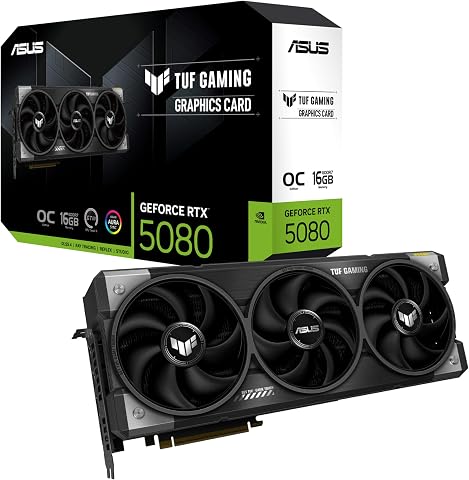 ASUS TUF Gaming GeForce RTX 5080 16GB GDDR7 OC Edition Graphics CardView on Amazon →
- 3
 GIGABYTE GeForce RTX 5080 Gaming OC 16G Graphics CardView on Amazon →
- 4
 ASUS NVIDIA GeForce RTX 5070 OC Edition Graphics Card (PCIe 5.0, 12GB GDDR7,…View on Amazon →
- 5
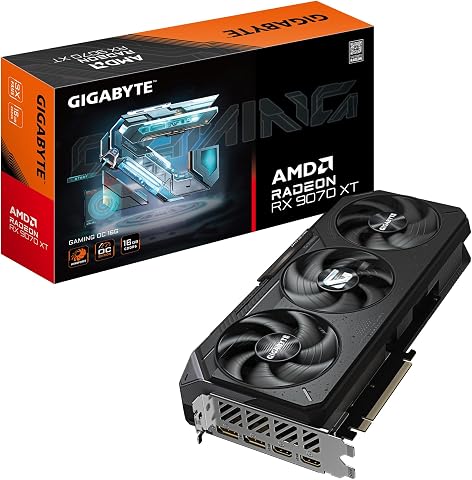 GIGABYTE Radeon RX 9070 XT Gaming OC 16G Graphics CardView on Amazon →
- 6
 ASUS Prime Radeon RX 9070 XT 16GB GDDR6 OC Edition Gaming Graphics CardView on Amazon →
- 7
 ASRock Radeon RX 9070 Challenger 16GB OC Graphics Card, RDNA 4, 2520MHz Boost…View on Amazon →
- 8
 Kelinx AISURIX RX 580 8GB GDDR5 Graphics Card with Dual HDMI and DisplayPortView on Amazon →
- 9
 GT 730 Graphics Card 4GB DDR3 64-bit with HDMI, DisplayPort, VGAView on Amazon →
- 10
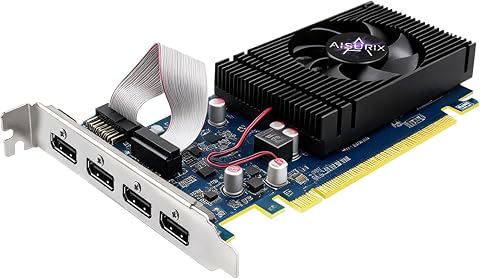 AISURIX GT 740 4GB GDDR5 Low-Profile Graphics Card with 4 HDMI PortsView on Amazon →
How the GPU Tiers Differ
The roundup is useful because the cards span substantially different jobs. As the ThorstenMeyerAI.com guide’s descriptions indicate, a high-end gaming GPU may be excessive for office tasks and a basic monitor, while an older display-focused card is not presented as a substitute for a modern GPU in demanding games. Readers need to match the card to their games, display resolution and refresh rate instead of choosing from model names alone.
Compatibility can change the shortlist as much as performance. The guide flags case clearance, airflow, power supply capacity and connectors as checks to make before buying. A card that fits a compact case or connects to existing monitors may be more useful to a particular owner than a faster model that cannot be installed or powered easily.
Products Worth Considering

Apple MacBook Pro 14.2-inch with M5 Pro, 15-Core CPU, 16-Core GPU, 24GB Memory, 2TB SSD, Wi-Fi 7, Space Black

LG 27GR83Q-B 27-inch Ultragear QHD IPS Gaming Monitor

LG 27G810A-B 27-inch UltraGear 4K UHD IPS Gaming Monitor
As an affiliate, we earn on qualifying purchases.
How the Guide Ranks Its Picks
ThorstenMeyerAI.com organizes its choices by intended use: RTX 5080 and RX 9070 XT models sit at the high-performance end; the RX 9070 and RTX 5070 offer less extreme modern options; and the GT 730, GT 740 and RX 580 serve narrower needs. The article says it considered product positioning and board design within GPU families, but does not claim to have tested every card directly.
Its practical advice is to check the specific games and applications a PC will run, then compare card dimensions with the case and the GPU’s power requirements with the installed supply. The source also cautions that more video memory alone does not make a slower GPU equivalent to a faster one. These factors can matter more to an individual build than the guide’s overall ranking.
What the Guide Does Not Establish
The ThorstenMeyerAI.com source does not give a publication date, current prices, measured frame rates, power-consumption figures or a full specification table for all 10 cards. It also does not state which games, resolutions or settings were used to compare performance. As a result, its recommendation of the ASUS TUF RTX 5080 as the overall pick is the author’s judgment, not a conclusion supported here by disclosed benchmark data.
Exact fit and power compatibility depend on the specific board and the rest of a PC. Buyers should check manufacturer specifications for the card under consideration, including dimensions, connectors and power guidance. The guide does not establish that every listed model is currently available or offers good value at today’s prices.
Checks Before Choosing a Card
The ThorstenMeyerAI.com guide advises readers to narrow the list by workload and system limits. Identify the games and applications in use, the monitor’s resolution and refresh rate, and whether features such as ray tracing matter. Then verify the exact card dimensions, required power connectors and manufacturer power-supply guidance against the PC.
Before purchasing, compare current prices and independent performance tests for the specific games or software involved. Those details are not supplied in the source, so the 10-card list is best used as a starting shortlist rather than a definitive buying result.
Key Questions
Which card does the guide rank as its overall pick?
ThorstenMeyerAI.com names the ASUS TUF Gaming GeForce RTX 5080 as its overall choice for a high-end gaming build. The source does not provide benchmark results to support a measured comparison.
Which options are presented as less extreme modern gaming choices?
The ThorstenMeyerAI.com guide highlights the ASRock Radeon RX 9070 Challenger and ASUS Prime GeForce RTX 5070 for buyers considering a capable upgrade without choosing from the highest performance tier in the list.
Are the GT 730 and GT 740 aimed at demanding modern games?
No. The guide describes these older cards as better suited to basic display output or narrower upgrade needs than to demanding games. It identifies the RX 580 as the more gaming-oriented of its older-card selections.
What should I check before installing a graphics card?
Check the exact card’s length, thickness, slot clearance, airflow needs, power connectors and power-supply guidance. Also confirm that it provides the display connections needed for your monitors.
Does the guide include benchmark scores or current prices?
No benchmark scores, testing conditions or current prices are provided in the ThorstenMeyerAI.com source. Readers should consult current pricing and independent tests for their intended games or applications before making a decision.
Source: ThorstenMeyerAI.com